Why Static Inspection Reports Do Not Close the Loop for Retail Property Managers
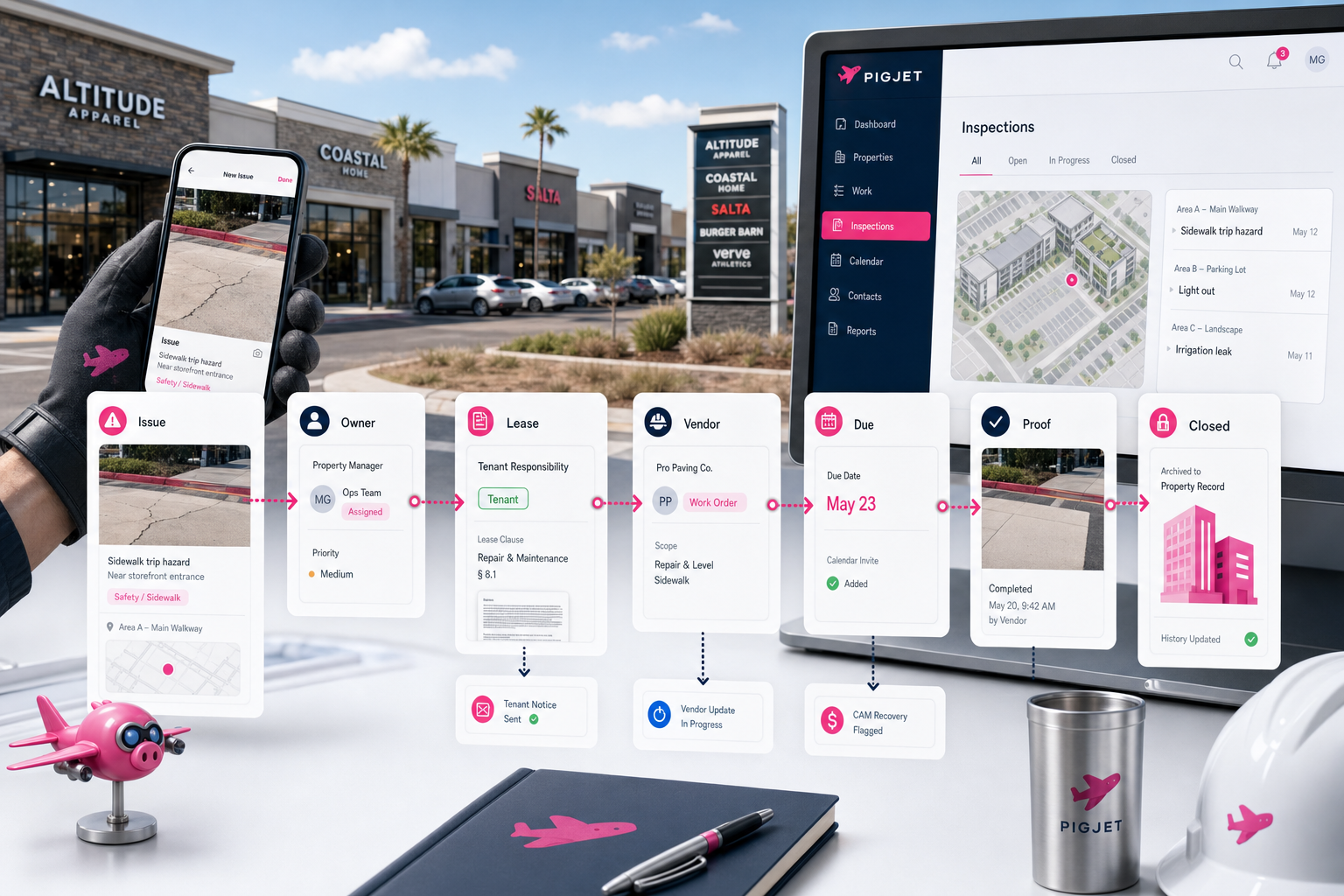
Retail property inspections are supposed to create control. In practice, many of them create a polished record of unresolved work.
A property manager walks an open-air center, captures photos, checks boxes, adds notes, and exports a report. The report shows a damaged bollard, a roof leak, a trash enclosure problem, a faded sign panel, a tenant maintenance issue, or a vendor cleanup item. Everyone can see what was found.
That visibility matters. But the report is not the finish line.
The real operating question is what happens next: who owns the issue, what does the lease say, which vendor should handle it, whether the tenant needs notice, whether the cost is recoverable, where completion proof is stored, and whether leadership can see that the work actually closed.
For shopping center operators, static inspection reports break down because the inspection is only one piece of the property record. The follow-up lives across leases, emails, vendor relationships, COIs, invoices, CAM treatment, photos, tasks, and manager memory.
The Inspection Report Creates Visibility, Not Completion
An inspection report is valuable because it captures what was seen at a point in time. It gives the team a property-by-property record and helps managers compare conditions across a portfolio.
But a static report does not assign responsibility by itself.
It does not decide whether the tenant, landlord, or vendor owns the fix. It does not confirm whether the vendor is insured. It does not draft the tenant notice. It does not preserve the photos with the task history. It does not remind the manager to verify completion. It does not tell accounting whether the cost should be flagged for CAM recovery or excluded under the lease.
That gap is where inspection programs lose value.
A retail operator can have a detailed report and still have open items drifting through inboxes, text messages, vendor calls, and spreadsheets. The report improved visibility, but it did not create operational follow-through.
Retail Properties Have Too Many Handoffs For Static Reporting
Retail property management has more handoffs than a checklist can carry.
One inspection item may touch several people:
- the property manager who found the issue
- the regional manager who wants status visibility
- the vendor who needs scope and access
- the tenant if the lease makes them responsible
- the lease administrator if the clause is unclear
- the accounting team if the cost may be recoverable
- the risk or compliance owner if insurance proof is missing
That is why a photo in a report is only the beginning. A shopping center issue usually needs context before the next step is obvious.
Take a storefront repair. The lease may make glass, signage, HVAC, storefront doors, or specific maintenance items the tenant's responsibility. A generic inspection note cannot answer that. The team needs the lease clause, prior tenant communication, photos, vendor history, and a clear record of notice.
Or take a parking lot issue. A pothole may be landlord responsibility, but the repair may involve vendor insurance, tenant disruption, CAM coding, completion photos, and later backup if a tenant questions the charge.
Static reporting captures the observation. Closed-loop operations capture the decision trail.
The Missing Layer Is Property Context
The strongest property managers already know a lot of the context. They know which tenants are sensitive, which vendors are slow, which repairs tend to become disputes, and which lease clauses matter.
That knowledge is useful, but it is fragile when it lives in memory.
A closed-loop inspection workflow needs to connect the finding to the surrounding property record:
- lease obligations and responsibility language
- tenant emails and prior notices
- vendor assignment history
- COI and insurance status
- photos, invoices, and documents
- expense coding or CAM recovery notes
- due dates and open tasks
- completion proof
Without that context, the team keeps reconstructing the same facts. The inspection report says what happened. The manager then opens the lease, searches email, calls a vendor, checks a spreadsheet, asks accounting, and updates leadership manually.
That may work at a few properties. It becomes expensive as the portfolio grows.
What A Closed-Loop Inspection Workflow Should Include
A closed-loop workflow does not need to be complicated. It needs to make sure each inspection finding has a path from observation to resolution.
At minimum, the workflow should answer six questions.
1. What Was Found, And Where?
The finding should be tied to the right property, building, suite, tenant, area, or asset. A photo without location context creates follow-up work for someone else.
For open-air retail, location matters. A roof issue above one tenant, a common-area lighting issue, and a tenant-controlled storefront problem may lead to different responsibilities and recovery treatment.
2. Who Owns The Next Step?
Every finding needs an owner. That owner might be an internal property manager, a vendor, a tenant, a regional manager, or a lease administrator.
The point is not to assign blame. The point is to prevent the finding from becoming a report item that everyone saw and nobody owned.
3. What Does The Lease Or Contract Say?
Retail inspection findings often turn into responsibility questions. Is this tenant maintenance? Is it landlord common-area work? Is the vendor under contract? Is notice required before charging back a cost?
The workflow should make lease and contract context easy to consult before the team takes action.
4. What Communication Was Sent?
If the tenant or vendor needs follow-up, the communication trail should stay with the issue.
That means the notice, vendor request, scope clarification, status update, and completion confirmation should not disappear into separate inboxes. Communication is part of the operating record.
5. What Proof Shows Completion?
Completion proof matters because retail property work is visible. Tenants notice when a repair stalls. Owners ask why the same issue appears on multiple reports. Vendors may mark work complete before the property manager agrees.
Photos, invoices, timestamps, and manager notes should be stored with the issue so the team can see what changed.
6. Does This Affect CAM, Risk, Or Compliance?
Some inspection items are operational only. Others affect recoveries, exclusions, caps, insurance, or risk.
If a repair is potentially recoverable through CAM, the team should flag that while the facts are fresh. If a vendor or tenant COI is missing, the finding should route to the person who owns insurance follow-up. If a lease exclusion applies, that should be preserved before year-end reconciliation.
The inspection workflow does not need to become the accounting system. It does need to preserve the context accounting will need later.
Why This Matters More As Portfolios Grow
At one center, a strong manager can often keep follow-up in their head. At ten centers, that gets harder. At a regional or enterprise retail portfolio, it breaks.
More properties create more inspections, more vendor issues, more tenant responsibility questions, more COI gaps, more photos, more invoices, and more leadership updates. The work does not scale cleanly if every unresolved item has to be reconstructed from a report, an email thread, and someone's memory.
The goal is not fewer property managers. The goal is better operating leverage for the team already doing the work.
Good managers should spend less time chasing status and more time making judgment calls. Regional leaders should not need to ask whether a report item became a task. Accounting should not have to guess why a repair was coded a certain way months later. Tenants should not see the same unresolved issue on every visit.
That is what "closing the loop" means in retail property operations.
How PigJet Fits
PigJet is designed around the operating context commercial property teams need: leases, tenant records, communications, documents, tasks, vendors, COIs, and CAM-related workflow.
For inspection follow-up, the practical value is not another place to store a PDF. It is giving the team a cleaner path from issue found to issue resolved.
That means inspection findings should be able to connect to the lease, tenant, vendor, document trail, communication history, and next task. If the finding affects tenant responsibility, COI follow-up, vendor accountability, or CAM recovery, that context should stay with the property record instead of being rebuilt later.
Many enterprise retail operators already have accounting systems they are not trying to rip out. That is fine. The accounting system can remain the financial record while PigJet helps organize the operational work around it.
The important shift is moving from a static report to a living workflow.
Start With One Inspection Workflow
Retail operators do not need to redesign every system to improve inspection follow-through.
Start with one recurring workflow:
- common-area inspection findings that become vendor work
- tenant maintenance issues that require lease responsibility checks
- COI gaps found during property or vendor review
- repair items that may need CAM coding or exclusion notes
- leadership follow-up for open inspection exceptions
Then measure whether each finding has an owner, next step, due date, communication trail, and completion record.
If the team still has to ask "whatever happened to that item from the last inspection?" the loop is not closed.
Bottom Line
Static inspection reports are useful, but they are not operational control.
Retail property managers need a workflow that turns inspection findings into assigned work, vendor accountability, tenant notices, completion proof, and recoverable context where appropriate.
The inspection report should show what was found. The property record should show what happened next.
For shopping center operators trying to manage more properties without losing follow-through, that difference matters.
PigJet helps commercial property teams connect the lease, tenant, vendor, document, communication, and task context around daily operations. If inspection findings are still ending as PDFs, emails, and reminders, that is a practical workflow to test in a one-property PigJet pilot or alongside your existing commercial property management software.