CAM Reconciliation Software for QuickBooks Users
QuickBooks Can Hold the Numbers. It Does Not Explain the CAM Logic.
QuickBooks is often the right accounting system for a small or mid-size commercial landlord. The bookkeeper knows it. The CPA knows it. Vendor bills, bank feeds, income, expenses, and owner reports already live there.
That does not mean QuickBooks should be the system where a landlord rebuilds CAM reconciliation from scratch every year.
The hard part of CAM reconciliation is not entering a final invoice. It is proving how the number was calculated. A tenant's year-end true-up depends on the lease, the expense pool, recoverable and excluded costs, pro-rata share, estimates billed during the year, credits, caps, base-year terms, and any special tenant carveouts.
QuickBooks can show the final receivable. It can record the tenant payment. It can keep the general ledger clean.
But if the reasoning behind the charge lives in spreadsheets, lease PDFs, email threads, and someone's memory, QuickBooks is only seeing the end of the process. That is where disputes start.
What CAM Reconciliation Software Should Do Around QuickBooks
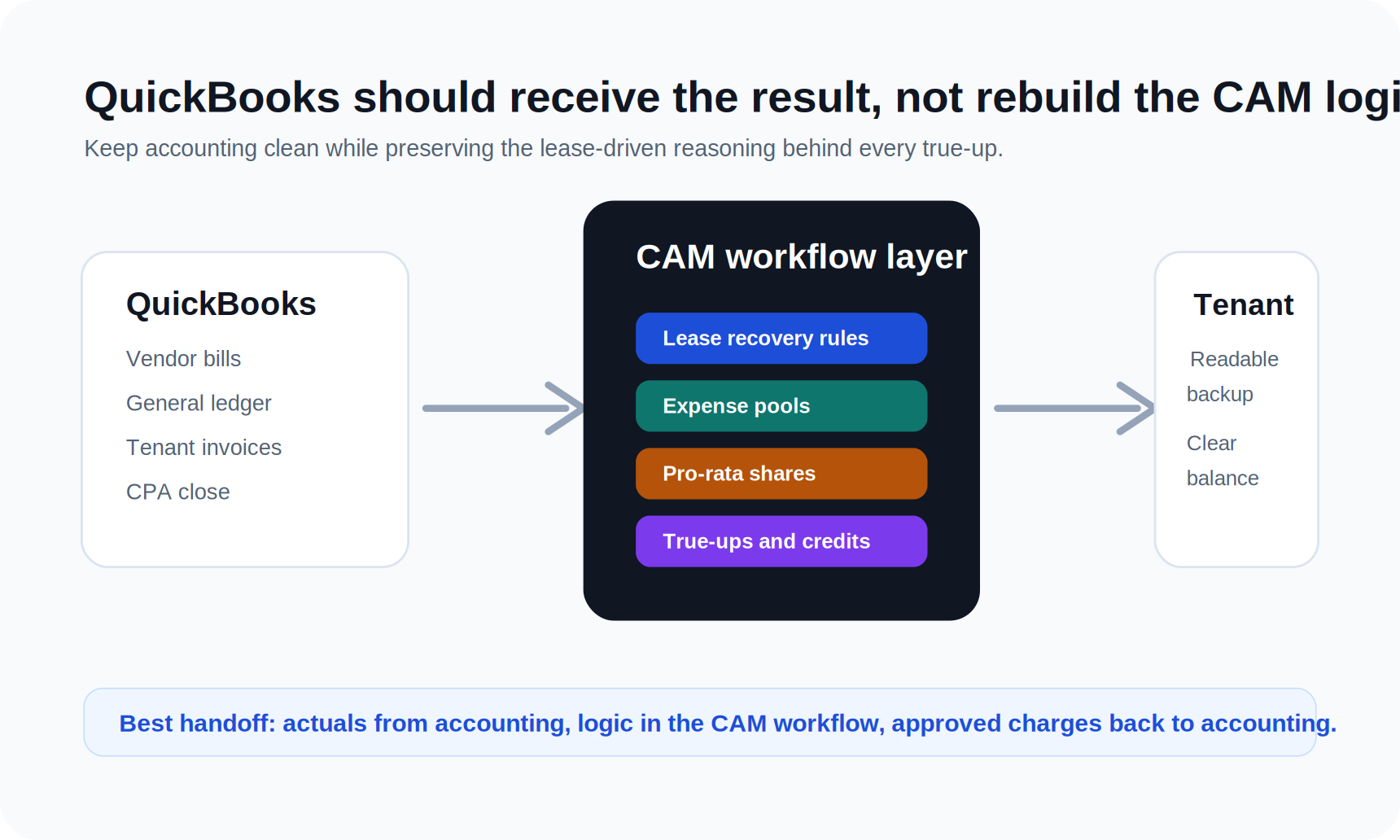
Good CAM reconciliation software does not have to replace QuickBooks. For many landlords, the better setup is a commercial property management layer that handles lease-driven CAM logic and then keeps the accounting handoff clean.
That layer should answer practical questions before the invoice reaches the books:
- Which expenses belong in each CAM, tax, insurance, utility, or operating expense pool?
- Which tenants participate in each pool?
- What is each tenant's pro-rata share?
- Which costs are excluded, capped, grossed up, or treated differently by lease?
- What estimates were billed during the year?
- Does the tenant owe a true-up, or should they receive a credit?
- What backup should be sent with the reconciliation statement?
- What should be posted to QuickBooks after the calculation is approved?
Those questions are property management and lease administration questions first. Accounting matters, but accounting should not be forced to reverse-engineer the lease economics.
For landlords already using QuickBooks, the goal is usually simple: keep QuickBooks as the accounting source of record, but stop using spreadsheets as the operating system for CAM.
Why Spreadsheets Break During Year-End True-Ups
Spreadsheets work when the portfolio is small, the leases are simple, and the same person remembers every exception. They break when the portfolio gets just complicated enough to create edge cases.
One tenant has a cap on controllable expenses. Another excludes management fees. A restaurant has a different trash allocation. An anchor tenant has negotiated carveouts. One suite changed size mid-year. A vacancy changed the denominator. The prior owner used a different CAM estimate. A tenant paid estimated CAM all year, but the charge was coded inconsistently in the ledger.
None of those problems are unusual. They are normal commercial landlord work.
The issue is that spreadsheets make every exception fragile. A formula gets copied wrong. An expense category is included in one tab but excluded in another. A tenant's square footage changes in the rent roll but not in the reconciliation workbook. The year-end file makes sense to the person who built it, but not to the tenant, the property manager, the owner, or the next bookkeeper.
QuickBooks does not fix that by itself because QuickBooks is not reading the lease and building the CAM pool. It is recording accounting activity.
That is why CAM reconciliation software should preserve the workflow behind the number, not just the number itself.
The Minimum Workflow QuickBooks Users Need
If you are evaluating CAM reconciliation software while keeping QuickBooks, start with the actual workflow your team needs at year-end.
First, the system should connect expenses to properties and recovery categories in a way that mirrors the leases. CAM, taxes, insurance, utilities, admin fees, repairs, landscaping, snow removal, security, and management fees may be treated differently by lease. A clean chart of accounts helps, but it is not enough if the recovery rules are stored elsewhere.
Second, the system should keep lease terms tied to each tenant. That includes pro-rata share, rentable area, reimbursement structure, caps, exclusions, estimate billing, renewal changes, amendments, and any special language that affects recovery.
Third, it should compare what was billed during the year against what should be recovered after actual expenses are known. This is where many landlords still run a manual workbook: pull actual expenses from QuickBooks, paste them into a CAM tab, check the rent roll, adjust tenant shares, subtract estimates, create a reconciliation schedule, then manually invoice or credit each tenant.
Fourth, it should produce tenant-ready backup. A reconciliation statement needs more than a dollar amount. Tenants want to know which costs were included, how their share was calculated, what they already paid, and why the final balance changed.
Finally, the approved output should flow cleanly back to accounting. QuickBooks should receive the invoice, credit, or journal-supporting detail your accounting process requires. It should not be where the entire reconciliation is rebuilt manually.
What to Look For in CAM Reconciliation Software
The best software for a QuickBooks-using landlord should be judged by lease accuracy and accounting handoff, not by generic property management checklists.
Look for these capabilities:
- Lease-level recovery rules, not just tenant balances
- Expense pool setup by property and charge type
- Pro-rata share tracking that stays tied to the rent roll
- Support for estimates, actuals, true-ups, and credits
- Clear treatment of excluded or capped expenses
- Tenant reconciliation statements with readable backup
- Internal review before charges are sent to accounting
- A QuickBooks workflow that supports the bookkeeper instead of replacing them
Avoid evaluating the product only on whether it says "CAM" on a feature page. CAM can mean anything from a simple recurring charge to a full annual reconciliation workflow. The difference matters.
A basic system may track monthly CAM estimates and let you bill tenants. That is useful, but it is not the same as managing year-end true-ups across multiple leases with different recovery language.
For a deeper explanation of the workflow, see NNN CAM reconciliation software and the CAM reconciliation checklist for landlords.
Where QuickBooks Should Stay In the Process
QuickBooks still has an important role. It should hold the accounting records, support the close, help the CPA review financials, and provide the ledger data that informs recoverable expenses.
For many landlords, the right process looks like this:
1. Vendor bills and expenses are recorded in QuickBooks. 2. CAM reconciliation software pulls or references the relevant expense detail. 3. Lease rules determine recoverable pools, allocations, exclusions, and tenant shares. 4. The team reviews and approves tenant true-ups. 5. Final invoices, credits, or accounting entries are posted back to QuickBooks. 6. Tenant backup stays tied to the property, lease, and reconciliation year.
That structure respects what QuickBooks is good at. It also keeps lease operations from becoming an undocumented side process.
The benefit is not just speed. It is auditability. When a tenant disputes a charge in March, the team can trace the number back to the lease and the expense pool instead of opening last year's workbook and hoping nothing changed after it was sent.
Why This Matters More for NNN Landlords
CAM reconciliation is painful in any commercial portfolio, but NNN landlords feel the pain faster because reimbursement structure is central to the economics.
In a triple-net lease, the landlord is not simply collecting base rent. The landlord is also managing pass-throughs tied to taxes, insurance, maintenance, common area costs, utilities, admin fees, and other operating expenses. The lease decides what can be recovered and how.
That means a small error can become a tenant relationship problem. Overbill a tenant and you create trust issues. Underbill a tenant and ownership absorbs costs that should have been recovered. Send unclear backup and even a correct charge can turn into a dispute.
QuickBooks can help record the result, but it does not automatically protect the landlord from weak lease interpretation, missing exclusions, or inconsistent allocation logic.
NNN landlords need the reconciliation process to be both accurate and explainable.
How PigJet Handles the Gap
PigJet is built for commercial landlords who want the lease logic, CAM workflow, rent roll, tenant context, and accounting handoff in one place.
For QuickBooks users, that means PigJet does not start from the assumption that you want to throw away your accounting process. The point is to make the property management side stronger so the accounting side receives cleaner, better-supported outputs.
PigJet helps landlords keep lease terms, CAM structures, tenant communications, rent schedules, and reconciliation context connected. Instead of treating CAM as a spreadsheet exercise that happens once a year, PigJet treats it as part of the operating record for each property and lease.
That is the difference between recording a CAM charge and actually managing CAM reconciliation.
If your team is using QuickBooks but still building year-end true-ups in Excel, the next step is not necessarily a full accounting migration. It is a better commercial property management layer around the books.
See how PigJet connects commercial lease operations with QuickBooks property management workflows, or get started to walk through CAM reconciliation for your portfolio.